Jira Administrator Practice Questions
Prepare for ACP-100 with more than an answer.
- 1
Jan asked you to create a new Select List custom field called Department for his project MCAS.
You created the field in the morning. In the afternoon, Jan notes that his Jira dashboard is not showing the field correctly. He asks to help him troubleshoot.
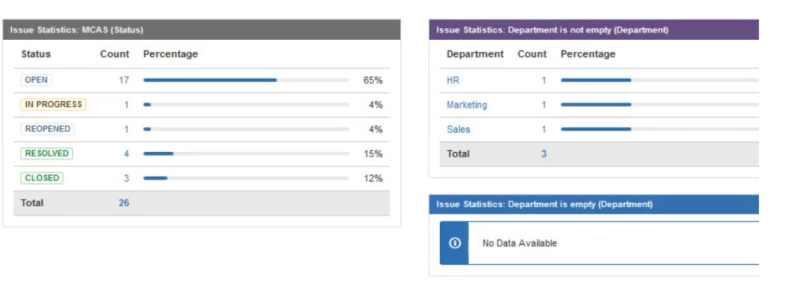
View the Exhibit to see Jan’s entire dashboard.
• The first gadget shows 26 issues in the project by Status.
• The second gadget shows that there are three issues that have the new Department field set.
• The last gadget shows “No Data Available”. The filter query for that gadget is “project=MCAS and Department is empty.”Why does Jan’s gadget say “No Data Available”?
Show answer details
Correct answer: C
C
- 2
Jon is a new Jira user. He reports that adding comments to Jira isn’t working as expected. When he attempts to ©mention a user, no list of available users is provided. Because he does not know everyone’s username, he is unable to target comments to specific users.
What is the cause of this problem?
Show answer details
Correct answer: D
- 3
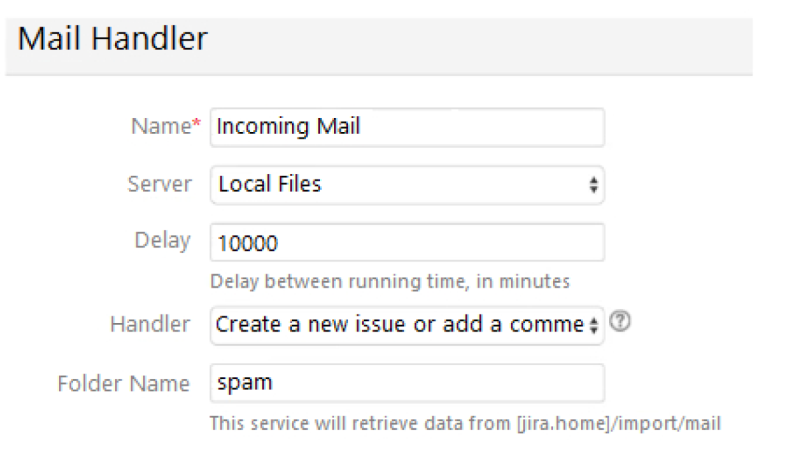
Inspect your current Incoming Mail Handler configuration:
Identify one reason why the current configuration is not fetching emails as planned.
Show answer details
Correct answer: D
Reference: httDs://confluence.atlassian.com/iirakb/troubleshoot-incoming-mail-in-jira-service-desk-790960076.html
- 4
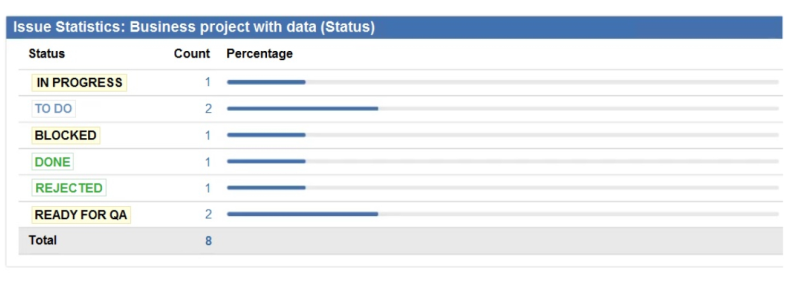
A dashboard displays an Issue Statistics gadget as shown.
The dashboard owner wants to change the order of the statuses shown in the gadget to appear as follows.
• To Do
• In Progress
• Ready For QA
• Blocked
• Rejected
• DoneWhich action will permanently arrange the statuses into the required order?
Show answer details
- 5
In your organization, a cobbler leads a Jira project with two issue types:
• Shoe Order
• RepairThe cobbler has given you the following requirements:
• All screens should use the Summary, Description, Due Date, and Components fields.
• Both issue types need to use a new custom field called Shoe Type on all screens.
• The Priority field should appear on all screens for Repair issues.
•Users should not be able to set the Priority for Shoe Orders during creation, but the Priority field still needs to be editable and viewable after creation.Identify the minimum number of screens and screen schemes that will meet the requirements.
Show answer details
Correct answer: A
A
- 6
Your HR project has two issue types:
• Join
• LeaveBoth issue types share a field configuration, screens and the workflow.
You currently use the Due Date system field to indicate when someone actually joins or leaves.
New HR staff members complain that using the Due Date field is not very intuitive.
How can you help your HR team?
Show answer details
Correct answer: C
C
