MS-500 Practice Questions
Prepare for MS-500 with more than an answer.
Unlock the full exam and previous versions
- v1Version 1 263 questions Locked
- MS-500Legacy Microsoft 365 Security Administration 218 questions Current
- Exam fee
- $165 USD
- Level
- Associate
- Valid for
- 1 year
Domains covered on the exam 4
- Implement and manage identity and access25%
- Implement and manage threat protection30%
- Implement and manage information protection15%
- Manage compliance in Microsoft 36520%
- 1
NOTE: This question is a part of a series of questions that present the same scenario. For each of the following statements, select the best response(s) to the question or statement below. Each answer is worth one point.
After you answer a question in this section, you will NOT be able to return to it. As a result, these questions will not appear in the review screen.
Your organization has a single-domain, single-forest Active Directory. You have installed Azure AD Connect with express settings. You need a new group that you want to use to manage access to a cloud application you have registered with Azure Active Directory.
What type of group will you create?
Show answer details
Correct answer: A
Explanation: Using express settings on AD Connect will sync users and certain groups (and other things) from on-premises to a zure AD. Creating the group on the on-premises AD will work, since it will be synchronized to the cloud. Since you are creating a group to be used to manage access to a n application, a security group is best. You can only create 0365 groups in AAD. -- Reference: https://docs.microsoft.com/en-us/azure/active-directory/fundamentals/active-directory-groups-create-azure-portal
- 2
Which of the following are Azure AD Conditional Access controls'? (Choose three.)
Show answer details
Correct answer: D, E, F
D, E, F -- Explanation: Think of assignments and conditions as the incoming signals that are part of every sign-in. The other side of conditional access is access controls (or just controls). Assignments and conditions is the incoming information at sign-in; the access controls are applied for the specified combination of assignments/conditions. -- Reference: https://docs.microsoft.com/en-us/azure/active-directory/conditional-access/overview
D, E, F -- Explanation: Think of assignments and conditions as the incoming signals that are part of every sign-in. The other side of conditional access is access controls (or just controls). Assignments and conditions is the incoming information at sign-in; the access controls are applied for the specified combination of assignments/conditions. -- Reference: https://docs.microsoft.com/en-us/azure/active-directory/conditional-access/overview
D, E, F -- Explanation: Think of assignments and conditions as the incoming signals that are part of every sign-in. The other side of conditional access is access controls (or just controls). Assignments and conditions is the incoming information at sign-in; the access controls are applied for the specified combination of assignments/conditions. -- Reference: https://docs.microsoft.com/en-us/azure/active-directory/conditional-access/overview
- 3
How do you integrate 0365 ATP with MD-ATP? Each option is a complete solution. (Choose two.)
Show answer details
Correct answer: B, C
B, C -- Explanation: 0365 ATP is referred to a s 0365 threat intelligence in the integration settings. You can enable the integration between the two products from either side. You don't have to configure the integration on both sides. This is true for 0365 ATP and MD-ATP, but not for all three ATP products. Be sure to understand which ATP products can be integrated with each other and when you would need to do so. -- Reference: https://docs.microsoft.eom/en-za/microsoft-365/security/office-365-security/integrate-office-365-ti-with-wdatp#to-integrate-office-365-atp-with-microsoft-defender-atp
https://docs.microsoft.com/en-za/microsoft-365/security/office-365-security/office-365-ti
B, C -- Explanation: 0365 ATP is referred to a s 0365 threat intelligence in the integration settings. You can enable the integration between the two products from either side. You don't have to configure the integration on both sides. This is true for 0365 ATP and MD-ATP, but not for all three ATP products. Be sure to understand which ATP products can be integrated with each other and when you would need to do so. -- Reference: https://docs.microsoft.eom/en-za/microsoft-365/security/office-365-security/integrate-office-365-ti-with-wdatp#to-integrate-office-365-atp-with-microsoft-defender-atp
https://docs.microsoft.com/en-za/microsoft-365/security/office-365-security/office-365-ti
- 4
You are using Attack Surface Reduction (ASR) in Microsoft 365 security center to help reduce your Windows 10 attack surfaces.
Which of the following is a prerequisite requirement for deploying ASR to Windows 10 devices?
Show answer details
Correct answer: C
- 5
You need to consider the underlined segment to establish whether it is accurate.
Your company makes use of Microsoft Teams.
You are currently preparing to place all the content in a specific team on hold.
You run the Get-LinkedUser cmdletto a scertain which mailbox and which Microsoft SharePoint site collections are linked to the team.
Select “No adjustment required? if the underlined segment is accurate. If the underlined segment is inaccurate, select the accurate option.
Show answer details
Correct answer: C
C
- 6
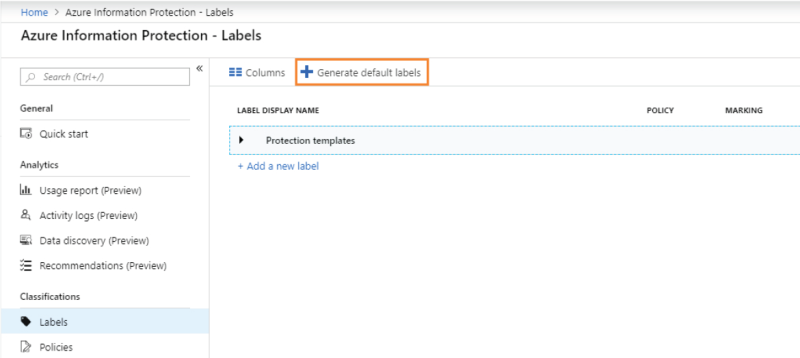
You click on the button as indicated in the exhibit.
Select all of the sensitivity labels that are generated by AIP. (Choose five.)
Show answer details
Correct answer: A, D, E, H, J
A, D, E, H, J
A, D, E, H, J
A, D, E, H, J
A, D, E, H, J
A, D, E, H, J
- 7
You're deploying Defender ATP. You want it to apply automatic remediation to all users, except for executives who must be manually remediated.
What do you configure to a chieve this?
Show answer details
Correct answer: C
- 8
Your organization has several conditional access policies for various purposes. One of these policies requires users to provide MFA when they access Teams. However, you're uncertain that all users are being prompted for MFA and you want to verify this.
Where would you obtain information to help you reach your goal?
Show answer details
- 9
Which of the following 0365 ATP Safe Attachment options delivers the message to the user, regardless whether or not malware was detected in the attachments? (Choose four.)
Show answer details
Correct answer: A, B, E, F
A, B, E, F -- Explanation: Block is the only option that does not deliver the message to the user.
Allow is not a valid setting.
Off and monitor delivers the message with attachments.
Replace will only deliver the message after attachments have been confirmed safe; any unsafe attachments will be replaced with a message stating that the attachment contains malware.
Dynamic will deliver the message without attachments while they are being scanned and update the message with the safe attachments. Unsafe attachment will be replaced by a message stating that the attachment contained malware. -- Reference: https://docs.microsoft.com/en-us/microsoft-365/security/office-365-security/dynamic-delivery-and-previewing
A, B, E, F -- Explanation: Block is the only option that does not deliver the message to the user.
Allow is not a valid setting.
Off and monitor delivers the message with attachments.
Replace will only deliver the message after attachments have been confirmed safe; any unsafe attachments will be replaced with a message stating that the attachment contains malware.
Dynamic will deliver the message without attachments while they are being scanned and update the message with the safe attachments. Unsafe attachment will be replaced by a message stating that the attachment contained malware. -- Reference: https://docs.microsoft.com/en-us/microsoft-365/security/office-365-security/dynamic-delivery-and-previewing
A, B, E, F -- Explanation: Block is the only option that does not deliver the message to the user.
Allow is not a valid setting.
Off and monitor delivers the message with attachments.
Replace will only deliver the message after attachments have been confirmed safe; any unsafe attachments will be replaced with a message stating that the attachment contains malware.
Dynamic will deliver the message without attachments while they are being scanned and update the message with the safe attachments. Unsafe attachment will be replaced by a message stating that the attachment contained malware. -- Reference: https://docs.microsoft.com/en-us/microsoft-365/security/office-365-security/dynamic-delivery-and-previewing
A, B, E, F -- Explanation: Block is the only option that does not deliver the message to the user.
Allow is not a valid setting.
Off and monitor delivers the message with attachments.
Replace will only deliver the message after attachments have been confirmed safe; any unsafe attachments will be replaced with a message stating that the attachment contains malware.
Dynamic will deliver the message without attachments while they are being scanned and update the message with the safe attachments. Unsafe attachment will be replaced by a message stating that the attachment contained malware. -- Reference: https://docs.microsoft.com/en-us/microsoft-365/security/office-365-security/dynamic-delivery-and-previewing
- 10
NOTE: This question is a part of a series of questions that present the same scenario. For each of the following statements, select the best response(s) to the question or statement below. Each answer is worth one point.
After you answer a question in this section, you will NOT be able to return to it. As a result, these questions will not appear in the review screen.
A user with the UPN of [email protected] leaves your organization and his user account is deleted. 40 days later you are asked to recover a large volume of data from the user's OneDrive. Your administrator user account is [email protected]. From the OneDrive admin center, you verify that the days to retain files in OneDrive after a user account is marked for deletion is set to 60 days.
What do you do third?
Show answer details
Correct answer: D
Explanation: Granted, this scenario question is a little contrived due to the limitations of the Udemy exam system. For exam preparation be sure to understand the sequence of events required to restore a deleted OneDrive. -- Reference: https://docs.microsoft.com/en-us/onedrive/restore-deleted-onedrive
