300-410 Practice Questions
Prepare for 300-410 with more than an answer.
- Exam fee
- $300 USD
- Level
- Professional
- Valid for
- 3 years
Domains covered on the exam 4
- Layer 3 Technologies35%
- VPN Technologies20%
- Infrastructure Security20%
- Infrastructure Services25%
- 1
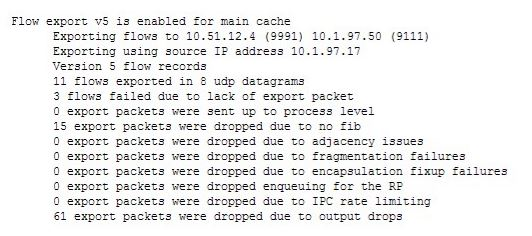
Examine the output of the show ip flow export command:
Which statement is true regarding the results?
Show answer details
Correct answer: C
Explanation:
Sixty-one packets were dropped because the send queue was full. The last line in the output, 61 export packets were dropped due to output drops, will result when the send queue is full.
Fifteen packets were not dropped because there was insufficient memory to create the export packet. Drops that occurred from insufficient memory are indicated with the line 3 flows failed due to lack of export packet, and there were only three of them.
Three export packets were not dropped because CEF was unable to switch or forward the packet to the process level. Drops that occurred because CEF was unable to switch or forward the packet, are indicated with the line 15 export packets were dropped due to no fib, and there were fifteen of them.
Eleven flows were sent, not eight. The eleven flows were sent in eight datagrams.
Objective: Infrastructure Services Sub-Objective: Configure and verify Cisco NetFlow -- References: Cisco > Cisco IOS NetFlow Command Reference > show ip flow export Home > Products & services > Cisco IOS and NX-OS software > Cisco IOS Technologies > Management instrumentation > Cisco IOS NetFlow > Data sheets and literature > Introduction to Cisco IOS NetFlow - A Technical Overview - 2
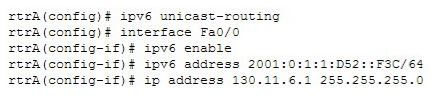
Refer to the following set of commands:
Which of the following statements is TRUE about the given set of commands?
Show answer details
Correct answer: A
Explanation:
The correct answer is that IPv4 and IPv6 are running simultaneously on rtrA. The set of commands enables IPv6 on the rtrA router and assigns an IPv4 address and an IPv6 address to the FaO/O interface. This indicates that the router is a dual-stack router on which both IPv4 and IPv6 are running simultaneously.
The IPv4 address is not translated to the IPv6 address by the given set of commands because NAT-PT is not enabled on the router. To enable NAT-PT on a router, you need to use the ipv6 nat command. In addition, the ipv6 nat prefix command should be used to specify an IPv6 prefix.
The IPv6 address is not an IPv4-compatible address. IPv4-compatible IPv6 addresses are used in automatic IPv4-compatible IPv6 tunnels. These addresses refer to those IPv6 unicast addresses that have zeros in the first 96 bits and an IPv4 address in the last 32 bits. For example, 0:0:0:0:0:0:192.156.10.67 is an IPv4-compatible IPv6 address where 192.156.10.67 is an IPv4 address. The IPv6 address (2001:0:1:1:D52::F3C/64), in this case, is not an IPv4-compatible IPv6 address.
A tunnel is not created for the interoperability of the IPv4 and IPv6 addresses because the given set of commands configures the router as a dual-stack router. There are no commands for configuring a tunnel on the router.
Objective: Network Principles Sub-Objective: Recognize proposed changes to the network --
References: Cisco IOS IPv6 Configuration Guide, Release 12.4 > Implementing IPv6 Addressing and Basic Connectivity > Configuration Examples for Implementing IPv6 Addressing and Basic Connectivity > Example: Dual Protocol Stacks Configuration - 3
You just discovered that a ping packet sent from one of the devices to another took a different path in the return than it did on its way to the destination.
What behavior caused this?
Show answer details
Correct answer: D
Explanation:
This behavior is caused by asymmetric routing. This is quite common in a routed network and usually is not a problem. It can, however, become an issue when firewalls reside in a routed path. Firewalls can cause problems when they maintain state information about connections. State information is used to determine if return connection is allowed. If the return path is routed through a different firewall, it will not have the correct state information for the connection, and the return will be disallowed.
It is not caused by windowing. This is a technique used to adjust the number of packets that can be acknowledged at once by a receiving computer in a transmission. In times of congestion, the window or number of packets that can be acknowledged at a time will be small. Later, when congestion goes down, the window size can be increased.
The behavior is not caused by the maximum segment size (MSS). This value specifies the largest amount of data, in octets, that a computer or communications device can receive in a single TCP segment. This will not cause a packet to take a different path in the return than it did on its way to the destination.
The behavior is not caused by global synchronization. This occurs when congestion on the network causes all devices to reduce their transmission rates at the same time. The result is the network cycling between sharp increases and sharp decreases in traffic.
Objective: Network Principles Sub-Objective: Explain TCP operations -- References: Home > Services > Technical services newsletter > Tech insights > Chalk talk > Asymmetric Routing and Firewalls - 4
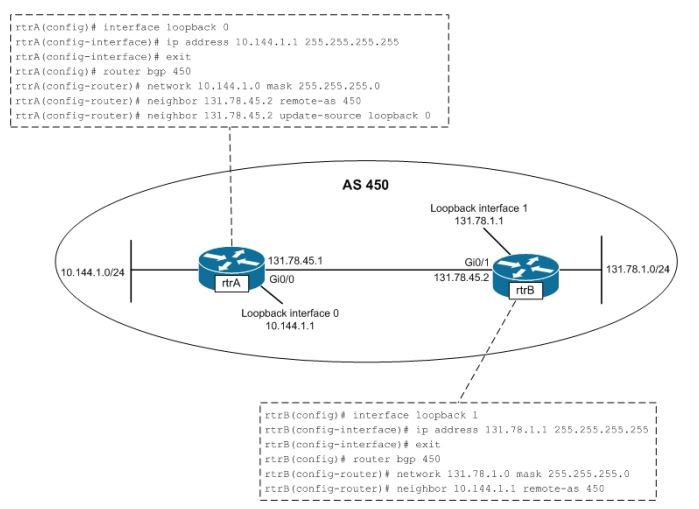
Which of the following statements is TRUE about the communication occurring between rtrA and rtrB in the given exhibit?
Show answer details
Correct answer: A
A
- 5
You recently implemented SNMPv3 to increase the security of your network management system. A partial output of the show run command displays the following output that relates to SNMP.
Which of the following statements is true of this configuration?
Show answer details
Correct answer: B
Explanation:
It provides neither authentication nor encryption. In SNMPv3 there are three combinations of security that can be used: noAuthNoPriv- no authentication and no encryption noauth keyword in the configuration AuthNoPriv - messages are authenticated but not encrypted auth keyword in the configuration AuthPriv - messages are authenticated and encrypted priv keyword in the configuration In this case, the keyword noauth in the configuration indicates that no authentication and no encryption are provided. This makes the implementation no more secure than SNMPvl or SNMPv2.
In SNMPvl and SNMPv2, authentication is performed using a community string. When you implement SNMP using the noauth keyword, it does not use community strings for authentication. Instead it uses the configured user or group name (in this case NORMAL). Regardless, it does not provide either authentication or encryption.
Objective: Infrastructure Services Sub-Objective: Configure and verify SNMP -- References: SNMP Configuration Guide, Cisco IOS XE Release 3SE (Catalyst 3850 Switches) > SNMPv3 - 6
You are the network administrator for a corporate organization. You changed the BGP configuration, then executed the following command on the rtrA router:
clear ip bgp 172.161.18.5 soft out
What is the result of this command?
Show answer details
Correct answer: C
Explanation:
The outbound TCP session between rtrA and 172.161.18.5 is cleared as a result of the given command. The given command is a variation of the clear ip bgp command.
The clear ip bgp command allows you to clear and reset the sessions or routing updates in BGP routers so that changes in the BGP configuration can take effect. You can use this command to clear and reset the sessions for all neighbors, a specific neighbor, or a group of neighbors. Use an asterisk (*) or the group name instead of the IP address to apply the command on all the neighbors of a router or a particular peer group, respectively.
For example, if you execute the clear ip bgp * command, all the sessions currently active are cleared and reset. If you use the clear ip bgp 172.161.18.5 command on rtrA, the current session between rtrA and its neighbor 172.161.18.5 is cleared and reset. Such a reset of sessions is known as hard reset. When hard resets are performed, the neighbor relationship is broken and must be reestablished.
The soft keyword, which is optional, indicates a soft reset. This keyword allows you to clear the BGP table without resetting the session. If you do not use this keyword, the sessions are cleared and then reset with a hard reset.
The out keyword specifies that the command should be applied to only outbound sessions. If you use the in keyword, the command is applied to only inbound sessions.
The outbound TCP session between rtrA and 172.161.18.5 is not cleared and reset by the given command. If the clear ip bgp 172.161.18.5 out command was used, then the outbound session between rtrA and 172.161.18.5 would be both cleared and reset.
The inbound TCP session between rtrA and 172.161.18.5 is not cleared and reset by the given command. If the clear ip bgp 172.161.18.5 in command were used, then the inbound TCP session between rtrA and 172.161.18.5 would be cleared and then reset.
The inbound TCP session between rtrA and 172.161.18.5 is not cleared by the given command. If the in keyword were used instead of the out keyword in the given command, the outbound TCP session between the rtrA and 172.161.18.5 would be cleared.
Objective: Layer 3 Technologies Sub-Objective: Describe, configure, and verify BGP peer relationships and authentication -- References: Cisco IOS IP Routing: BGP Command Reference > clear ip bgp - 7
Which command can you use to verify that interfaces have been configured in the correct areas and to show timer intervals and neighbor adjacencies for OSPF?
Show answer details
Correct answer: E
The show ip ospf interface command displays comprehensive OSPF interface information including area assignments, timer intervals (hello and dead timers), and neighbor adjacencies. This command is specifically designed to verify interface area configurations and show the operational OSPF parameters. The other commands serve different purposes: show ip ospf provides general OSPF process information, show ip route displays routing table entries, show ip protocol shows routing protocol configurations, and show ip ospf database displays LSA database contents without interface-specific details.
- 8
Routed0 is an area system border router (ASBR). The interfaces on Router 10 are configured as below:
S0/0 10.0.0.0/8
S0/1 172.16.0.0/8
FaO/0 192.168.5.0/24 Fa0/1 192.168.6.0/24You would like Router 10 to advertise the 192.168.5.0/24 and the 192.168.6.0/24 networks over OSPF in its Type 5 link-state advertisements (LSAs).
What command set would instruct the router to do this?
Show answer details
Correct answer: B
Explanation:
By default, Type 5 link-state advertisements (LSAs) do not include directly connected networks. To alter this behavior, you must execute the redistribute connected command in OSPF configuration mode. This command instructs the router to include these local interfaces in its advertisements, as follows:
RTAIO(config)# router ospf 1 RTAIO(config-router)# redistribute connected
You should not execute the command set that includes the redistribute static command. This instructs the router to advertise any statically defined routes that have been configured, instead of those that are local to the router.
You should not execute the command set that includes RTAIO(config)# redistribute connected. The redistribute connected command is shown being executed at the wrong command prompt, and will generate an error message. It must be executed in the OSPF configuration mode and not global configuration mode.
You should not execute the following command set:
RTAIO(config)# router ospf 1 RTAIO(config-router)# network 192.168.5.0 0.0.0.0 area 1 RTAIO(config-router)# network 192.168.6.0 0.0.0.0 area 1
The network commands will cause the networks to receive updates from the router, but do not allow them to be advertised in Type 5 LSAs.
Objective: Layer 3 Technologies Sub-Objective: Configure and verify redistribution between any routing protocols or routing sources -- References: Cisco > Home > Support > Technology Support > IP > IP Routing > Design > Design Technotes > Redistributing Connected Networks into OSPF - 9
You have been alerted that TCP traffic leaving an interface has been reduced to near zero, while UDP traffic is steadily increasing at the same time.
What is this behavior called and what causes it?
Show answer details
Correct answer: C
Explanation:
This behavior is called starvation and is caused by improper configuration of QoS queues. When TCP and UDP flows are assigned to the same QoS queue, they compete with one another. This is not a fair competition because the TCP packets will react to packet drops by throttling back TCP traffic, while UDP packets are oblivious to drops and will take up the slack created by the diminishing TCP traffic. The results from mixing UDP and TCP traffic in the same queue are: • Starvation • Latency • Lower throughput
While it is true that jitter can be caused by a lack of QoS, jitter is not what is being described in the scenario. Jitter is the variation in latency as measured in the variability over time of the packet latency across a network. This phenomenon seriously impacts time-sensitive traffic, such as VoIP, and can be prevented by placing this traffic in a high-priority QoS queue.
While latency can be caused by the maximum transmission unit (MTU) in the network, this is not a case of latency, although latency may be one of the perceived effects of starvation. Latency is the delay in reception of packets. The MTU is the largest packet size allowed to be transmitted, and an MTU that is set too large can result in latency.
While windowing can be caused by network congestion, this is not a case of windowing. This is a technique used to adjust the number of packets that can acknowledged at once by a receiving computer in a transmission. In times of congestion the window, or number of packets that can be acknowledged at a time, will be small. Later, when congestion goes down, the window size can be increased.
Objective: Network Principles Sub-Objective: Describe UDP operations -- References: Design Guide > Service Provider Quality of Service > CE Guidelines for Collapsing Enterprise Classes > Mixing TCP with UDP - 10
Which of the following statements are TRUE about manually configured IPV4-to-IP6 tunnels and GRE tunnels? (Choose two.)
Show answer details
Correct answer: A, D
Manually configured IPv4-to-IPv6 tunnels use the tunnel mode ipv6ip command to encapsulate IPv6 packets within IPv4 headers, while GRE tunnels use the tunnel mode gre ip command for Generic Routing Encapsulation. Additionally, manually configured tunnels are designed specifically for IPv6 transport and only support IPv6 as the passenger protocol, whereas GRE tunnels can carry multiple passenger protocols including IPv4, IPv6, IPX, and others. The other statements are incorrect because manually configured tunnels do not support IPv6 IGPs (they are point-to-point), and both tunnel types can forward IPv6 multicast traffic when properly configured.
Manually configured IPv4-to-IPv6 tunnels are purpose-built for IPv6 transport and only support IPv6 as the passenger protocol, while GRE tunnels support multiple passenger protocols including IPv4, IPv6, IPX, AppleTalk, and others due to their generic encapsulation design. The tunnel mode configuration also differs: manual tunnels use tunnel mode ipv6ip while GRE tunnels use tunnel mode gre ip. The incorrect options state that manual tunnels support IPv6 IGPs (they are point-to-point only) and that they block IPv6 multicasts (both tunnel types can forward multicast when configured properly).
